Laya Snake: local terminal demo
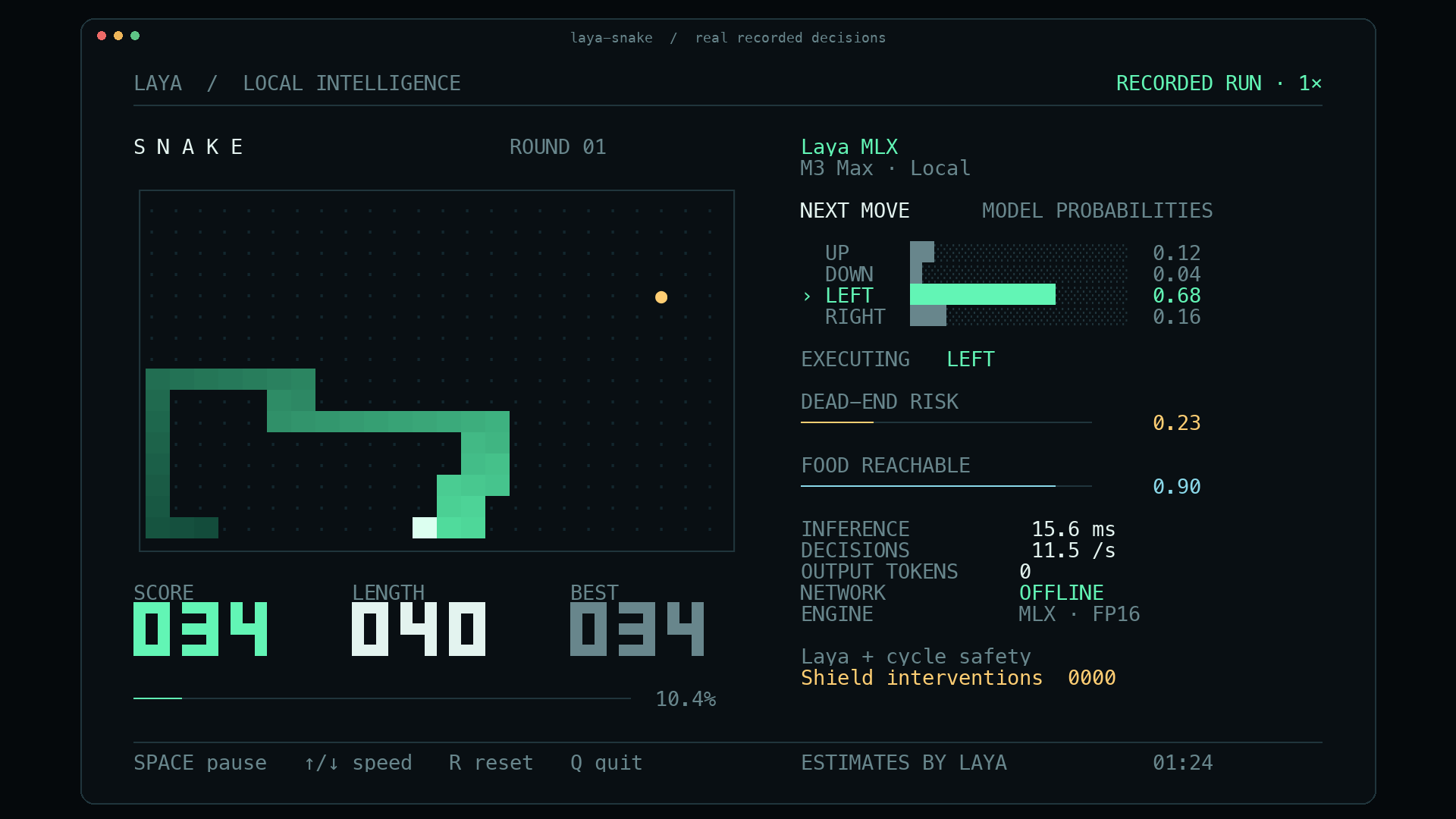
An actual Snake game driven by Laya MLX predictions on Apple silicon, with a terminal layout designed for a readable social clip. The left panel shows the board, score, length and best score. The right panel shows four direction probabilities, the executed move, two model estimates, measured inference time, decision rate and local/offline status.
Run
From this repository on an Apple silicon Mac:
uv run --extra demo laya-snakeThe default model is aac6fef/laya-multilingual-mlx, using the original FP16 weights. The demo first checks models/hub/laya-multilingual-mlx and models/laya-multilingual, then the local Hugging Face cache. It never downloads a missing model during play. On a fresh checkout, download the weights once beforehand:
uv run --extra demo hf download aac6fef/laya-multilingual-mlx \
  --local-dir models/hub/laya-multilingual-mlx
uv run --extra demo laya-snake
Use a terminal at least 104 columns × 35 rows with a monospace font and true color. Menlo works well on macOS. A smaller terminal pauses the game until resized. Default board size is 24 × 16, initial length is 6, and the presentation target is 12 decisions/second.
The live display respects NO_COLOR. If your shell sets it, use env -u NO_COLOR uv run --extra demo laya-snake for the colored presentation. The benchmark explicitly enables true color so this environment setting cannot silently change its rendering workload.
| Control | Action |
|---|---|
| Space | Pause / resume |
| ↑ / ↓, or + / − | Increase / decrease the paced target by 2 decisions/second |
| R | Start a new round with the next seed |
| Q or Ctrl-C | Quit and restore the terminal |
Useful modes:
# Every move waits for a new inference, with no pacing delay.
uv run --extra demo laya-snake --max-speed

# Optional measured compilation + prefix-reuse path.
uv run --extra demo laya-snake --optimize --max-speed

# Use the fixed computation-budget setting validated on the recorded M3 Max.
uv run --extra demo laya-snake --fps 20

# Execute the model's raw first choice without the execution safety shield.
uv run --extra demo laya-snake --unassisted

# A finite run without a terminal display.
uv run --extra demo laya-snake --headless --steps 600 --max-speed
--model accepts a local directory or an already cached Hub ID. --width, --height, --seed and --initial-length configure a run. Boards must be at least 4 × 4 with one even dimension, because the safety planner uses a Hamiltonian cycle. Speed keys affect paced mode; --max-speed always advances as soon as the current decision is complete.
Record and export
The recording contains actual board states, original model probabilities, executed actions, timings, model provenance and run summaries. Each board is paired with the prediction made before its next move.
uv run --extra demo laya-snake --fps 12 --duration 100 \
  --record artifacts/snake/run.jsonl

# ffmpeg is required for video export; on macOS: brew install ffmpeg
uv run --extra demo laya-snake export artifacts/snake/run.jsonl \
  --start 65 --seconds 30 --output artifacts/snake/demo.mp4 \
  --gif artifacts/snake/demo.gif

uv run --extra demo laya-snake export artifacts/snake/run.jsonl \
  --start 85 --output artifacts/snake/poster.png
MP4 export defaults to 1920 × 1080, 30 video frames/second, H.264, and original wall-clock speed. It renders the same terminal cells from the recorded data; it is a rendered replay, rather than a screen capture. A visible RECORDED RUN · 1× label and a JSON sidecar identify this. Exporting at 30 FPS does not turn a 12-decision/second game into a 30-decision/second game. At each video timestamp the exporter uses the most recent actual source frame. Fast recordings may have more decisions than the chosen video frame rate can display.
Use --headless when recording without an attached terminal. Model inference still happens for every move; live terminal drawing is omitted. Output files are not overwritten. Start a new recording when changing the presentation or speed rather than mixing pauses or resets into a short social excerpt.
The MP4 defaults to a 30-second excerpt and --gif exports its first 15 seconds at the same original pace. Use --gif-seconds to change the GIF duration. The shipped social assets include both formats plus a PNG poster.
What the AI does
This is a feature-assisted neural decision demo, using the existing Laya checkpoint without Snake training. A deterministic planner describes legal directions, safe cycle progress and current empty-cell connectivity. Laya receives those descriptions, including which safe direction makes the most progress. It returns a distribution over UP, DOWN, LEFT and RIGHT. The probability bars are those original model outputs.
The default safety shield executes the model’s highest-probability admissible direction. If the raw first choice is inadmissible, the UI keeps that original distribution and marks the executed move with SHIELD; the intervention counter increases. The default run is labeled Laya + cycle safety. --unassisted disables that execution restriction; it still gives the model planner features. Neither mode establishes that the checkpoint can infer Snake strategy from an unprocessed board.
One Agent.predict call batches three real questions per move:
| Display | Actual meaning |
|---|---|
| NEXT MOVE | Laya choice probabilities over the four described directions |
| DEAD-END RISK | 1 − P(safe route available), from a Laya noul answer |
| FOOD REACHABLE | Laya noul answer about the supplied current empty-cell reachability summary |
| INFERENCE | Synchronized Agent.predict wall time, including tokenization and result conversion |
| DECISIONS | Recent measured completed-decision rate |
| NETWORK OFFLINE | Local checkpoint loading and local inference with Hub offline mode; this does not switch off the Mac’s Wi-Fi |
The two estimates are model outputs, not calibrated Snake death probabilities. Current empty-cell reachability also differs from future reachability after the tail moves. Risk may remain low for a long time because the planner supplies a safe route. No random values or prerecorded predictions are substituted during live play.
The cycle shield preserves the cyclic order of the body and never advances past the tail or the food. Every admitted action makes positive progress toward the current food. For an initially valid board, this gives an available safe successor and a finite food-progress bound. Tests exercise arbitrary choices among admissible actions until a board is full.
Reproduce the speed test
uv run --extra demo laya-snake benchmark \
  --rates 10,12,15,18,20,25,30,35,40,45,50,60 \
  --sweep-steps 120 --soak-steps 600 --seeds 101,102,103,104 \
  --output artifacts/snake/benchmark.json
Use --resume --output artifacts/snake/benchmark.json to retain completed episodes and resume the recorded configuration. Each report identifies the checkpoint, prompt, environment and source hash. A failed rate needs no further seeds; a passing rate must complete every requested seed.
The benchmark measures model inference, planning, Rich composition, ANSI serialization into memory, and game updates. It excludes model loading, warmup and the terminal emulator’s own painting. Uncapped episodes measure actual sustained moves/second. Paced episodes separately check whether at least 99% of active ticks fit the requested computation budget, on every seed. OS sleep overshoot remains included in the reported achieved rate.
The final truecolor M3 Max run completed 8,160 decisions with zero deaths, including 2,400 uncapped steps at 63.61 steps/second overall. Its highest passing tested computation-budget setting was 20 FPS, with an achieved paced rate of 18.69–18.94 steps/second. Higher paced settings failed the stated deadline criterion, while the game remained alive. See the complete Snake benchmark report for per-seed results, interventions and limitations.
For a social clip, the default 12 FPS target gives viewers time to see the selected direction and growing score. --max-speed demonstrates measured throughput. The included 30-second video preserves the original pace of its source run.